Authentication
Authentication
Configure authentication for your Rapid MCP server
Overview
Rapid MCP supports two methods for passing your JWT bearer token:
- HTTP header —
Authorization: Bearer <token>(recommended for most clients) - URL query parameter —
?token=<token>(useful for clients that don't support custom headers, e.g. Claude Code Connectors)
Both methods work identically. If both are provided, the header takes precedence.
You can also:
- Set headers at the MCP server level so they are automatically passed to each tool call.
- Reference those headers inside a tool's Headers section using template variables like
{{api-key}}.
OAuth is planned and coming soon.
Video Walkthrough
Token via URL query parameter
If your client doesn't support setting custom headers (e.g. Claude Code's Connectors tab), you can pass the JWT token as a ?token= query parameter on the MCP URL:
https://rapid-mcp.com/mcp/<serverId>/stream?token=<your-jwt-token>This works for both the streamable HTTP (/stream) and SSE (/sse) endpoints. No header configuration needed — just append the token to the URL.
1) MCP server-level headers (API key)
Add an API key at the server level so it is forwarded to every tool call:
{
  "mcpServers": {
    "RapidMCP": {
      "url": "https://rapid-mcp.com/mcp/<serverId>/stream",
      "headers": {
        "Authorization": "Bearer XXXXX",
        "api-key": "example-api-key"
      }
    }
  }
}
Notes:
- Keys in
headersare exposed to tools as template variables. For example,api-key→{{api-key}}. - Keep header keys lowercase and without spaces for clean templating.
2) Tool-level headers using {{api-key}}
Inside a tool, add headers that reference the server-level API key:
Authorization: Bearer {{api-key}}
x-api-key: {{api-key}}
Add these in the tool editor under "Headers".
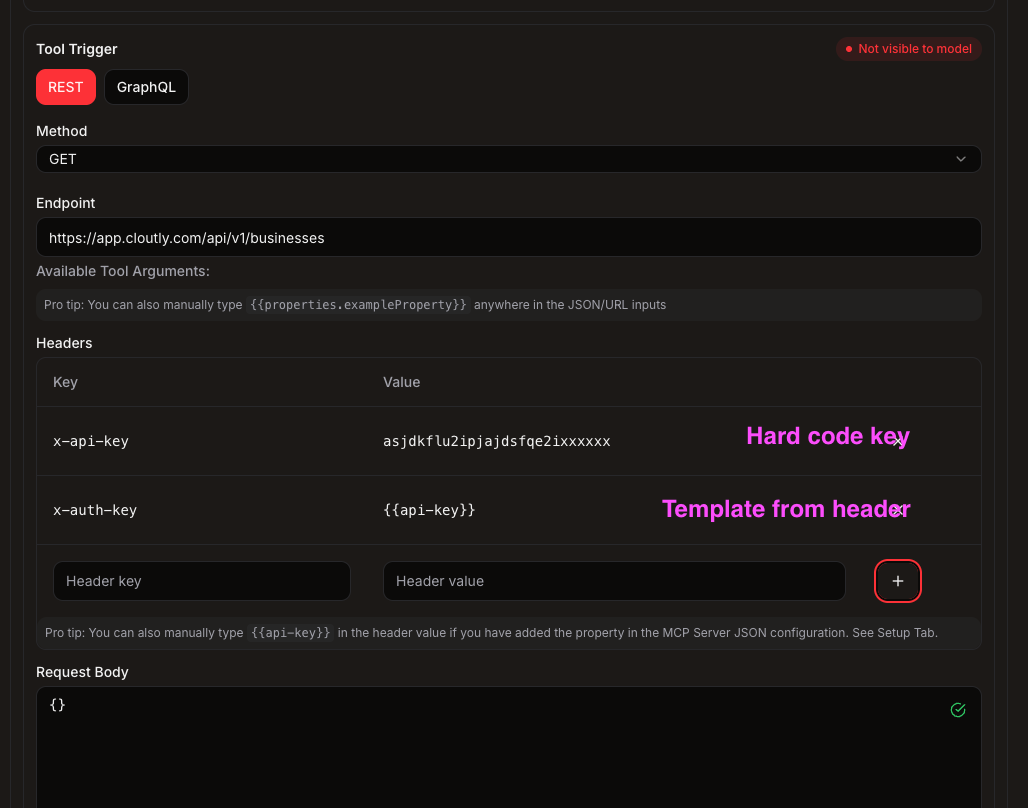
Tip: You can hardcode tokens per tool, but managing them at the server level makes rotation and reuse across tools easier.
3) Code example
Reference these variables in the tool custom code via the string template examples below:
async function code(inputs: ToolArguments) {
  const apiKey = "{{api-key}}" // <-- here will get interpolated with the server-level header value
  const subdomain = "{{subdomain}}" // <-- here will get interpolated with the server-level header value

  const response = await fetch(`https://${subdomain}.example-api.com/v1/${inputs.projectId}/stats`, {
    headers: {
      Authorization: `Bearer ${apiKey}`
    }
  })

  return response.json()
}
4) OAuth (coming soon)
We are adding first-class OAuth support. Planned flow:
- Configure OAuth client credentials at the server level
- Complete authorization once to securely store tokens
- Tokens automatically injected as request headers for tool calls
This section will be updated when available.